> ## Documentation Index
> Fetch the complete documentation index at: https://docs.fastgen.com/llms.txt
> Use this file to discover all available pages before exploring further.
# Loop data
**Iterate over each element in a collection.**
 ## Overview
The Loop Data action is designed to iterate over each element in a provided collection,executing the defined actions for each element.
### Accessing Action Output within a Loop
When you use actions inside a For Loop, each action's output can be accessed as if it were an array. This feature allows you to retrieve data from any specific iteration of the loop.
To access the output of an action in a specific iteration, use the following syntax:
* For a fixed iteration (e.g., the first iteration): `{{$action.actionName[0].outputField}}`
* For the last iteration: `{{$action.actionName[-1].outputField}}`
Here, `actionName` is the name of the action, and `outputField` is the specific field in the output you want to access. The index `0` refers to the first iteration, `1` for the second, and so on. The index `-1` always refers to the last iteration.
Learn more about this syntax and indexing variables in our [Variables Documentation](/variables/overview).
### Example
## Overview
The Loop Data action is designed to iterate over each element in a provided collection,executing the defined actions for each element.
### Accessing Action Output within a Loop
When you use actions inside a For Loop, each action's output can be accessed as if it were an array. This feature allows you to retrieve data from any specific iteration of the loop.
To access the output of an action in a specific iteration, use the following syntax:
* For a fixed iteration (e.g., the first iteration): `{{$action.actionName[0].outputField}}`
* For the last iteration: `{{$action.actionName[-1].outputField}}`
Here, `actionName` is the name of the action, and `outputField` is the specific field in the output you want to access. The index `0` refers to the first iteration, `1` for the second, and so on. The index `-1` always refers to the last iteration.
Learn more about this syntax and indexing variables in our [Variables Documentation](/variables/overview).
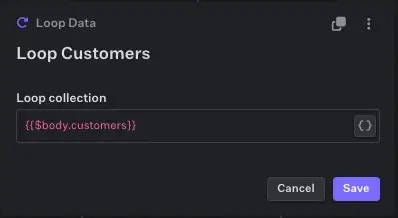
### Example
 ### Output
```json theme={null}
{
"$action['loop-customers']": {
"i": 2, // Last run iteration of the loop
"item": "Joe" // Last run item of the collection
}
}
```
### Output
```json theme={null}
{
"$action['loop-customers']": {
"i": 2, // Last run iteration of the loop
"item": "Joe" // Last run item of the collection
}
}
```