> ## Documentation Index
> Fetch the complete documentation index at: https://docs.fastgen.com/llms.txt
> Use this file to discover all available pages before exploring further.
# File Storage
 ## Overview
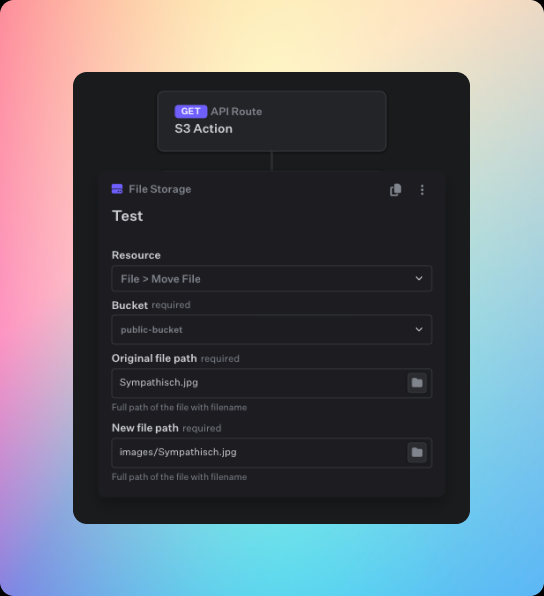
The File Storage action lets you manage your files and folders of your workspace buckets inside your APIs and Workflows. It covers a wide array of action for both files and folders including, getting, renaming, moving and deleting.
### File Management
#### Get File
Gets a presigned url of the file.
The bucket in which the file is located.
The full path of the file. If a file is nested inside a folder, the folders must be included inside the path separated by `/`, f.e. `images/header.jpg`
The expiration time of the presigned url in seconds.
#### Upload Url
This creates a PUT presigned url with which you can upload any file to the bucket.
The bucket to which the file should be uploaded.
The full path of the file. If the file should be uploaded to a nested folder, the folders must be included inside the path separated by `/`, f.e. `images/header.jpg`. All non existent folders in the path will be automatically added.
The type of upload. This is a dropdown and can either be *Single file upload* or *Multipart upload*.
* **[Single file upload](/file-storage/uploading-files/single-file-upload)**: Returns a presigned URL to which the user can upload the full file.
* **[Multipart upload](/file-storage/uploading-files/multipart-upload)**: Initiates a multipart upload and returns a URL where the user can upload the individual parts.
The expiration time of the presigned url in seconds.
#### Direct Upload
Directly uploads a given file to a bucket under a specified name.
The bucket to which the file should be uploaded.
The full path of the file. If the file should be uploaded to a nested folder, the folders must be included inside the path separated by `/`, f.e. `images/header.jpg`. All non existent folders in the path will be automatically added. If you want to keep the name that the file already has, you can specify it like `images/{{$file.myFile.name}}`.
A variable pointing to the file that is going to be uploaded. If this action is used within an API route which receives a file under the name `myFile` this value here would need to be `{{$file.myFile}}`
#### Move File
This lets you move a file within a bucket.
The bucket in which the file is located.
The full path of the orignial file. If a file is nested inside a folder, the folders must be included inside the path separated by `/`, f.e. `images/header.jpg`
The full path of the file where it should be moved to.
#### Rename File
This lets you rename a file inside a bucket.
The bucket in which the file is located.
The full path of the orignial file. If a file is nested inside a folder, the folders must be included inside the path separated by `/`, f.e. `images/header.jpg`
The new name of the file. Note, this should only be the name of the file WITHOUT any preceeding folder structure.
#### Delete File
This lets you delete any file inside a bucket.
The bucket in which the file is located.
The full path of the file. If a file is nested inside a folder, the folders must be included inside the path separated by `/`, f.e. `images/header.jpg`
#### List files
This lets you list all files of a given Bucket. Note, that the default limit of this request are 1000 files.
The bucket in which the file is located.
This lets you set a string of the preceeding folder path. It will only list items, that are inside the given folder path.
### Folder Management
#### Create Folder
This will create a folder inside a bucket.
The bucket in which the folder is located.
The full path of the folder. If a folder is nested inside another folder, the preceeding folders must be included inside the path separated by `/`, f.e. `images/highResolution/`
#### Delete Folder
This will delete any folder inside a bucket.
The bucket in which the folder is located.
The full path of the folder. If a folder is nested inside another folder, the preceeding folders must be included inside the path separated by `/`, f.e. `images/highResolution/`
#### Delete Folder
This will delete any folder inside a bucket.
The bucket in which the folder is located.
The full original path of the folder. If a folder is nested inside another folder, the preceeding folders must be included inside the path separated by `/`, f.e. `images/highResolution/`
The full path of the new folder. If the path includes non-existen folders, they will be created.
#### Rename Folder
This will rename a folder inside a bucket.
The bucket in which the folder is located.
The full original path of the folder. If a folder is nested inside another folder, the preceeding folders must be included inside the path separated by `/`, f.e. `images/highResolution/`
The new name of the folder. Note, this should only be the name of the current folder WITHOUT any preceeding folder structure.
## Overview
The File Storage action lets you manage your files and folders of your workspace buckets inside your APIs and Workflows. It covers a wide array of action for both files and folders including, getting, renaming, moving and deleting.
### File Management
#### Get File
Gets a presigned url of the file.
The bucket in which the file is located.
The full path of the file. If a file is nested inside a folder, the folders must be included inside the path separated by `/`, f.e. `images/header.jpg`
The expiration time of the presigned url in seconds.
#### Upload Url
This creates a PUT presigned url with which you can upload any file to the bucket.
The bucket to which the file should be uploaded.
The full path of the file. If the file should be uploaded to a nested folder, the folders must be included inside the path separated by `/`, f.e. `images/header.jpg`. All non existent folders in the path will be automatically added.
The type of upload. This is a dropdown and can either be *Single file upload* or *Multipart upload*.
* **[Single file upload](/file-storage/uploading-files/single-file-upload)**: Returns a presigned URL to which the user can upload the full file.
* **[Multipart upload](/file-storage/uploading-files/multipart-upload)**: Initiates a multipart upload and returns a URL where the user can upload the individual parts.
The expiration time of the presigned url in seconds.
#### Direct Upload
Directly uploads a given file to a bucket under a specified name.
The bucket to which the file should be uploaded.
The full path of the file. If the file should be uploaded to a nested folder, the folders must be included inside the path separated by `/`, f.e. `images/header.jpg`. All non existent folders in the path will be automatically added. If you want to keep the name that the file already has, you can specify it like `images/{{$file.myFile.name}}`.
A variable pointing to the file that is going to be uploaded. If this action is used within an API route which receives a file under the name `myFile` this value here would need to be `{{$file.myFile}}`
#### Move File
This lets you move a file within a bucket.
The bucket in which the file is located.
The full path of the orignial file. If a file is nested inside a folder, the folders must be included inside the path separated by `/`, f.e. `images/header.jpg`
The full path of the file where it should be moved to.
#### Rename File
This lets you rename a file inside a bucket.
The bucket in which the file is located.
The full path of the orignial file. If a file is nested inside a folder, the folders must be included inside the path separated by `/`, f.e. `images/header.jpg`
The new name of the file. Note, this should only be the name of the file WITHOUT any preceeding folder structure.
#### Delete File
This lets you delete any file inside a bucket.
The bucket in which the file is located.
The full path of the file. If a file is nested inside a folder, the folders must be included inside the path separated by `/`, f.e. `images/header.jpg`
#### List files
This lets you list all files of a given Bucket. Note, that the default limit of this request are 1000 files.
The bucket in which the file is located.
This lets you set a string of the preceeding folder path. It will only list items, that are inside the given folder path.
### Folder Management
#### Create Folder
This will create a folder inside a bucket.
The bucket in which the folder is located.
The full path of the folder. If a folder is nested inside another folder, the preceeding folders must be included inside the path separated by `/`, f.e. `images/highResolution/`
#### Delete Folder
This will delete any folder inside a bucket.
The bucket in which the folder is located.
The full path of the folder. If a folder is nested inside another folder, the preceeding folders must be included inside the path separated by `/`, f.e. `images/highResolution/`
#### Delete Folder
This will delete any folder inside a bucket.
The bucket in which the folder is located.
The full original path of the folder. If a folder is nested inside another folder, the preceeding folders must be included inside the path separated by `/`, f.e. `images/highResolution/`
The full path of the new folder. If the path includes non-existen folders, they will be created.
#### Rename Folder
This will rename a folder inside a bucket.
The bucket in which the folder is located.
The full original path of the folder. If a folder is nested inside another folder, the preceeding folders must be included inside the path separated by `/`, f.e. `images/highResolution/`
The new name of the folder. Note, this should only be the name of the current folder WITHOUT any preceeding folder structure.